
Difference Between Vector & Raster Artwork
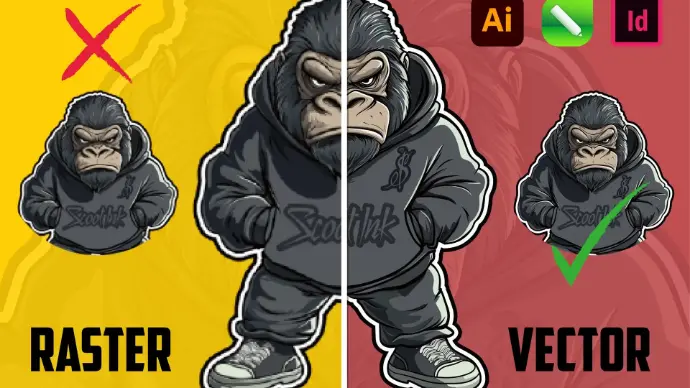
In the world of graphic design, printing, branding, and digital media, artwork format plays a critical role in determining quality, flexibility, and final output. Yet, one of the most misunderstood topics among businesses and even designers is the difference between vector artwork and raster artwork.
Clients often ask:
- “Why does my logo look blurry when printed large?”
- “Why is my file rejected by the printer?”
- “Can’t you just resize this image?”
- “Why do you need a vector file when I already sent a PNG?”
The answer almost always comes down to understanding vector vs raster artwork.
This blog provides a detailed, practical, and industry-focused explanation of both formats, how they work, where they are used, and why choosing the right one is crucial—especially for professional printing and production.
What Is Raster Artwork?
Raster artwork (also known as bitmap artwork) is made up of pixels—tiny colored squares arranged in a grid. Each pixel contains color information, and together they form an image.
Common Raster File Formats
- JPG / JPEG
- PNG
- GIF
- TIFF
- BMP
- PSD (Photoshop file)
Raster images are resolution-dependent, meaning their quality is fixed based on the number of pixels they contain.
How Raster Images Work
When you zoom into a raster image, you’ll eventually see individual square pixels. When you enlarge a raster image beyond its original resolution, the pixels stretch, causing:
- blurriness
- pixelation
- jagged edges
- loss of detail
This limitation makes raster images unsuitable for many professional printing applications.
What Is Vector Artwork?
Vector artwork is created using mathematical paths instead of pixels. These paths are defined by points, lines, curves, and shapes calculated by formulas.
Common Vector File Formats
- AI (Adobe Illustrator)
- EPS
- SVG
- PDF (vector-based)
- CDR (CorelDRAW)
How Vector Artwork Works
Instead of storing pixel data, vectors store:
- coordinates
- curves
- strokes
- fills
- shapes
This allows the artwork to scale infinitely without losing quality.
Vector vs Raster in Printing
Why Printers Prefer Vector Files
Printing requires:
- sharp edges
- clean lines
- accurate colors
- predictable output
Vector artwork provides all of these.
Raster Printing Issues
When raster artwork is used incorrectly:
- text becomes fuzzy
- edges appear jagged
- colors print unevenly
- logos lose professionalism
That’s why printers often reject raster logos.
Color Consistency Differences
Raster Color Issues
- RGB to CMYK conversion problems
- compression artifacts
- inconsistent shades
Vector Color Advantages
- exact Pantone matching
- clean color separations
- consistent print output
Common Mistakes Clients Make
1. Sending PNG Logos
PNG is not a print-ready logo format.
2. Upscaling Raster Files
Increasing resolution does not add detail.
3. Assuming PDF Is Always Vector
PDF can contain raster images.
Raster to Vector Conversion
When only a raster file is available, designers use vectorization to recreate the artwork manually.
Why Auto-Trace Fails
- messy paths
- incorrect curves
- broken shapes
- poor print results
Professional vectorization requires manual precision.
Impact on Branding
Inconsistent artwork formats cause:
- brand dilution
- unprofessional appearance
- inconsistent prints
- wasted marketing spend
Brands that invest in vector artwork maintain:
- visual consistency
- professional reputation
- scalable branding assets
Embroidery & Production Machines
Machines read vector paths as instructions.
Raster files:
- confuse machines
- cause stitch errors
- reduce output quality
Vectors are mandatory for clean production.
Cost & Time Efficiency
Correct artwork:
- reduces rework
- avoids production delays
- minimizes correction charges
- speeds up approval cycles
Future-Proofing Your Design Assets
Vector artwork ensures your designs remain usable for:
- years
- multiple platforms
- new print technologies
Raster artwork becomes obsolete quickly.
Final Thoughts
Understanding the difference between vector and raster artwork is essential for anyone involved in design, printing, or branding. Raster artwork is perfect for photographs and digital visuals, but vector artwork is the backbone of professional printing and production.
Choosing the wrong format leads to quality loss, higher costs, and production problems. Choosing the right one ensures clarity, consistency, and professionalism.
Conclusion
Vector and raster artwork serve different purposes—but they are not interchangeable. Knowing when and how to use each format empowers you to create better designs, print with confidence, and protect your brand identity.
If your goal is professional output, scalable branding, and error-free printing, vector artwork is not optional—it’s essential.